
The three plans #
| Free | Starter | Pro | |
|---|---|---|---|
| Price (US dollars) | $0 | $6 a month or $60 a year | $15 a month or $150 a year |
| Live pages | 1 | 5 | 25 |
| Stored pages (live and paused) | 5 | 25 | 100 |
| Rows per table | 500 | 2,000 | 10,000 |
| Size per page | 2 MB | 5 MB | 10 MB |
| Views per month | 10,000 (fair use) | Fair use | Fair use |
| “Made with TablePop” badge | Shown | Removed | Removed |
| Choose your own page address | No | Yes | Yes |
| Auto-update from Excel | No | Yes | Yes |
| Download HTML | No | Yes | Yes |
| Password-protected pages | No | No | Yes |
| Custom domains | No | No | 3 |
| Unlisted or public pages | Yes | Yes | Yes |
| All themes, layouts, display options and exports | Yes | Yes | Yes |
| Embeds and view analytics | Yes | Yes | Yes |
When these limits change, your account keeps the limits it started with. The Plan & billing page in your dashboard always shows yours.
The Free plan is free for as long as you use it. There is no trial clock and no card, and pages you publish on it stay published. Yearly billing costs ten months, so two months are free. There are no lifetime deals.
You keep what you signed up for. Your price stays the same for as long as your subscription runs, and if we change a plan’s limits later, existing subscriptions keep theirs. A change of limits never pauses a page you already have. Accounts that subscribed under earlier limits keep those limits.
Fair use of views #
A page is never blocked, and no reader is ever turned away, because of views.
- Free is meant for up to 10,000 views a month across your pages. When you reach 80 % and 100 %, the dashboard shows a notice, and at 100 % we send one email that month. Your pages stay online either way.
- Starter and Pro have no monthly level, only the fair use described in the Terms, section 4: ordinary publishing of your own tables, not use as a file host or an API for automated traffic.
View counts in the dashboard are approximate. They are a guide for you, not a meter we bill by.
Upgrade #
Upgrading works like this:
- Sign in to the dashboard at my.tablepop.app and open Plan & billing in the sidebar.
- In the Upgrade card, pick Starter or Pro, monthly or yearly.
- Checkout opens in a new tab on pythonandvba.com. Your payment details go straight to the payment provider and never reach TablePop.
- Your license key arrives by email. It looks like
ABCD-EFGH-IJKL-MNOP-QRSTU. Keep that email. - If you bought with the email you sign in to TablePop with, your plan is applied automatically the next time you sign in or open the dashboard or the Excel pane. If you bought with a different email, attach the key to your account (below).
Attach your license key #
Bought with the same email as your TablePop account? Then you can skip this: your plan is applied automatically. Attach the key only if you bought with a different email. You do this once, and either place works.
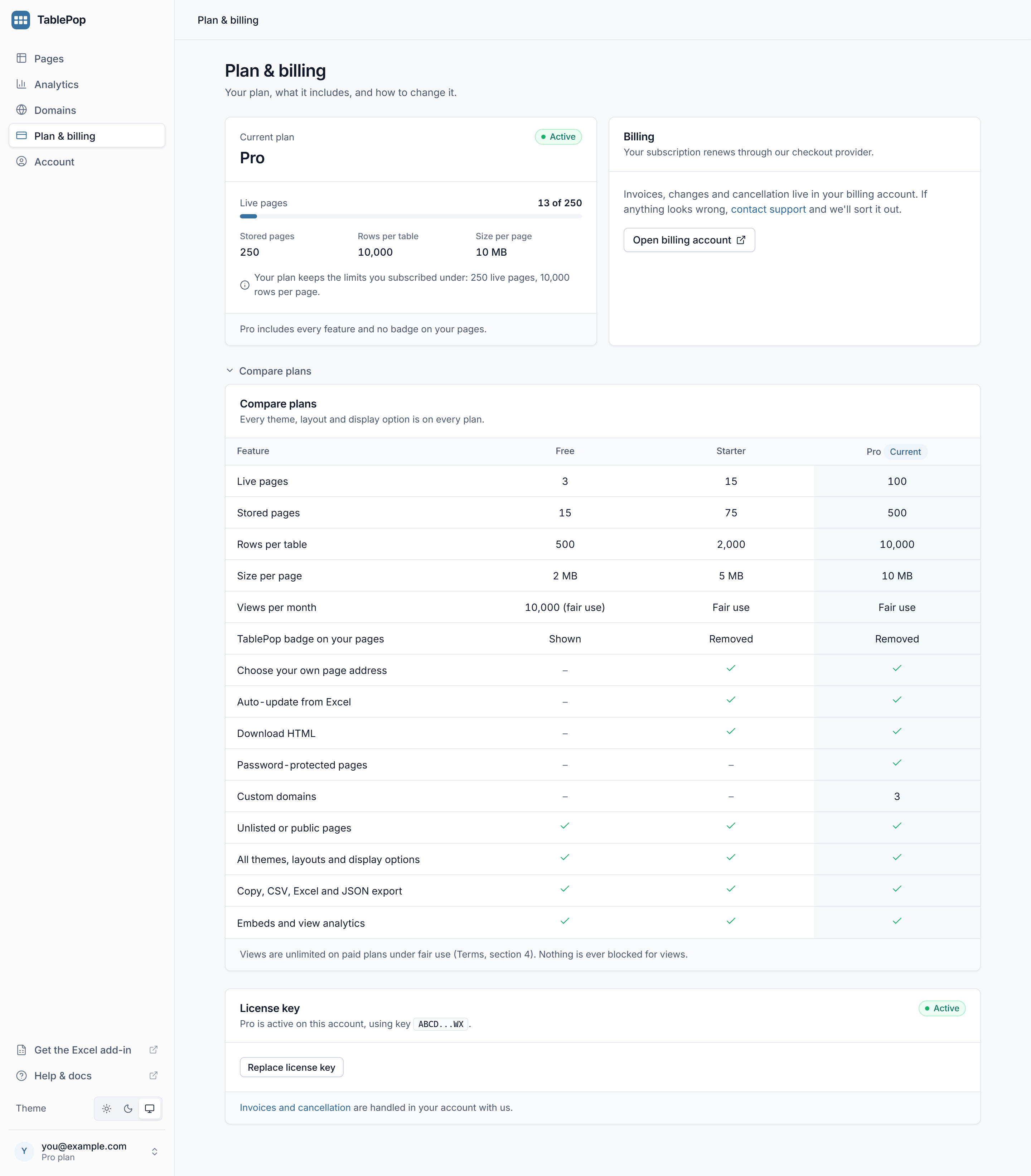
In the dashboard: on Plan & billing, paste the key into License key and press Attach key.
In the Excel pane: open the menu at the top left, choose Settings, paste the key into License key and press Activate.
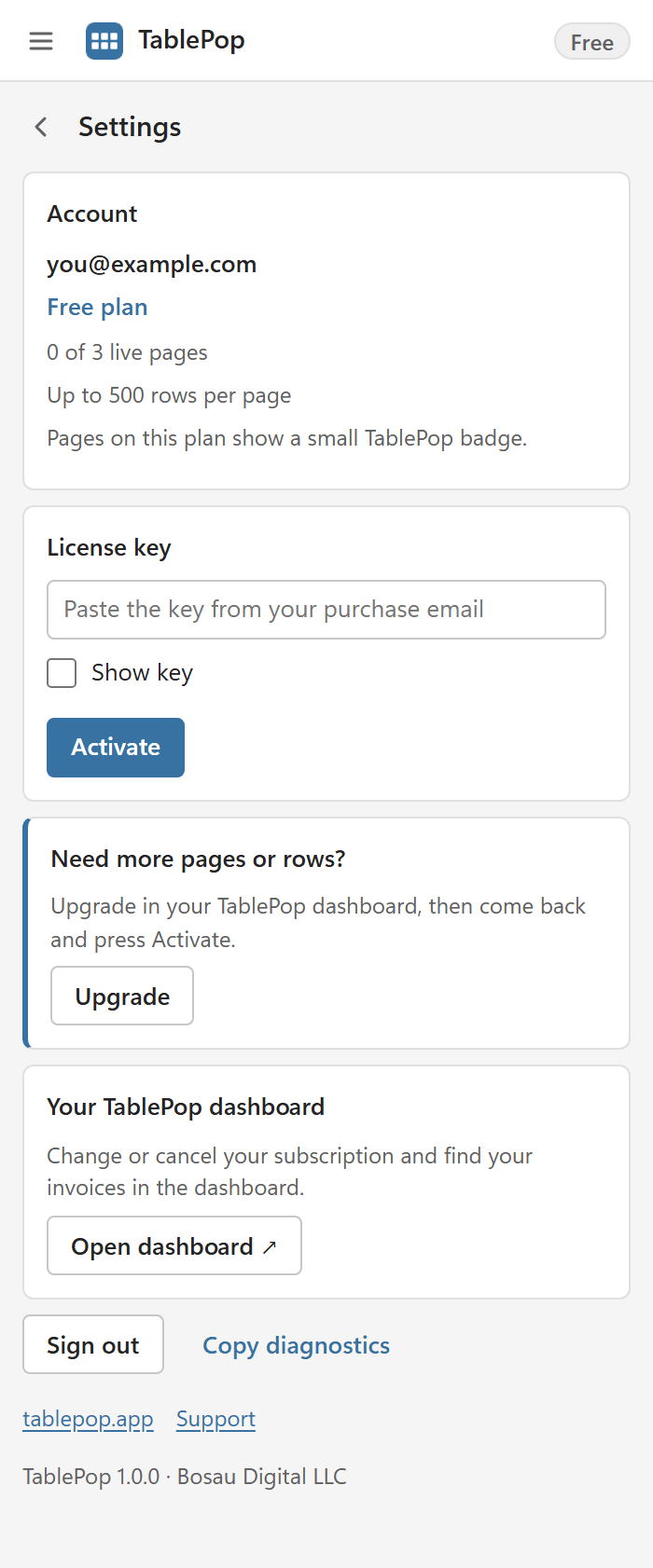
The new plan applies to your whole account straight away: the badge disappears from every page, the higher limits apply, and the paid features unlock. Nothing needs republishing.
Attach the key to the account you publish from. If you bought with one email address and sign in to TablePop with another, that is fine: attach the key to the account you sign in with.
Switch between Starter and Pro #
- Buy the other plan from Plan & billing.
- Under License key, open Replace license key, paste the new key and press Replace key.
- Cancel the old subscription. Replacing a key does not stop the old subscription from billing. The dashboard reminds you and links to your billing account.
Moving from Pro down to Starter follows the same rules as a plan ending (below): Pro features are kept for 14 days, then pages over Starter’s limits are paused.
Cancel your subscription #
- Open Plan & billing in the dashboard.
- In the Billing card, press Cancel subscription.
- Pick a reason, add a note if you like, and press Cancel subscription again to confirm.
Nobody needs to be emailed and there is no retention flow. The subscription stops renewing, and your plan stays active until the end of the period you already paid for. The plan card then shows the date it ends.
You can also cancel in your billing account at account.pythonandvba.com, which the Open billing account button takes you to.
When a paid plan ends #
Whether you cancelled or a payment failed, the result is the same, and it is deliberately gentle:
- Nothing changes for 14 days. Your plan keeps working as before, and we email you once with the date. The Plan & billing page shows it too.
- After that, nothing is deleted and no link breaks. Your account moves to the plan your key still allows (Free, or Starter when coming from Pro). Your most recently updated pages stay live up to that plan’s limit. The others are paused, not deleted, and show a short notice until they are resumed.
- Password-protected pages are paused if the new plan does not include them. They are never left online without their password.
- Custom domains fall back to the page’s
tablepop.appaddress. - Stored pages follow the new plan too. If you have more than it allows, nothing is deleted automatically, but you cannot publish new pages until you delete enough to get under the limit.
- On Free, the badge comes back and auto-update stops. Updating by hand keeps working within the Free limits.
Subscribe again and attach the key: pages paused for your plan and your custom domains come back at once. Pages you paused yourself stay paused until you resume them.
Invoices #
Invoices, payment details and your subscriptions live in your account with us at account.pythonandvba.com. Sign in there with the email address you bought with. The Invoices and cancellation link on the Plan & billing page goes there too.
Refunds #
Not what you expected? Contact us within 14 days of paying and you get a refund. No form and no reason required. Use the support page.
Common questions #
Can I move my key to a different account?
Yes. Contact support with the key and the email address of the account you want it on.
Does a plan cover more than one person?
A plan is for one person’s account. For a team, get in touch and we will work something out.
I own the classic TablePop add-in that exports HTML files. Does that include this?
They are separate products. The classic add-in exports a standalone HTML file you host yourself; TablePop Cloud publishes and hosts live pages for you.
Can I use published pages commercially?
Yes, on every plan. Client work, internal reports and public catalogues are all fine, as long as they stay within the Terms.