
SimpleGantt draws the chart from an ordinary Excel table. You do not have to rename your columns: it recognizes common header names in English, German, French, Spanish, Italian, Dutch and Portuguese, and checks the values in each column. This page lists what it looks for.
Table or range #
- Best: an Excel table (Home > Format as Table, or Ctrl+T). The chart follows the table as it grows or shrinks.
- A plain range with one header row also works. Select it, or one cell inside it, before you click Use selection.
- One row per task. Blank rows are skipped, and a table’s total row is ignored.
- Rows hidden by a filter are left out of the chart while Follow filters is on (the default), so filtering the table to your own tasks filters the chart too.
Columns #
| Field | Needed | Headers it recognizes (examples) |
|---|---|---|
| Task | Yes | Task, Name, Activity, Title, Description, Item, Aufgabe, Vorgang |
| Start | Yes, unless predecessors define it | Start, Start date, Begin, From, Beginn |
| End | End or Duration | End, Finish, Due, To, Ende |
| Duration | End or Duration | Duration, Days, Dauer |
| Progress | No | Progress, % complete, Complete, Done % |
| Predecessors | No | Predecessors, Dependencies, Depends on, After |
| ID | No | ID, #, No., Nr, Code |
| WBS or level | No | WBS, Outline, Level |
| Phase or group | No | Phase, Group, Stage, Category, Workstream, Section, Epic |
| Owner | No | Owner, Assignee, Resource, Responsible, Who |
| Status | No | Status, State |
| Milestone | No | Milestone, Type, Kind |
| Color | No | Color, Colour |
| Notes | No | Notes, Comment, Remarks, Details |
| Baseline start and end | No | Baseline start, Planned start, Baseline end, Planned end |
If the headers are ambiguous, the step Match your columns opens with the best guess selected. You can change the columns at any time under Edit > Data.
Value formats #
| Column | Accepted values |
|---|---|
| Start, End | Excel dates (with or without a time), text dates in your locale’s format, ISO dates such as 2026-10-05 |
| Duration | A number of days, or text such as 3d, 2w, 4h, 1.5d, 3 days. 0 makes a milestone. |
| Progress | 0 to 1, 0 to 100, or 45%. Values are capped at 100%. |
| Status | Any text. Done, Complete and Erledigt count as 100% when Progress is empty. |
| Milestone | Mark a row as a milestone with Yes in the Milestone column, or give it the same start and end date (or a duration of 0). X, TRUE and Milestone also count as yes. No makes a row with the same start and end date a one-day task; a blank cell leaves it a milestone. |
| Color | A color name (red, teal) or a hex code (#1F6FB2) |
| Predecessors | See Dependencies and lags |
How dates are counted #
- An end date without a time is inclusive. A task from Monday to Friday covers the whole Friday.
- A duration counts working days when weekends are skipped (the default) and calendar days otherwise.
- With both End and Duration filled in, End wins. With only one of them, SimpleGantt computes the other.
Rows with problems #
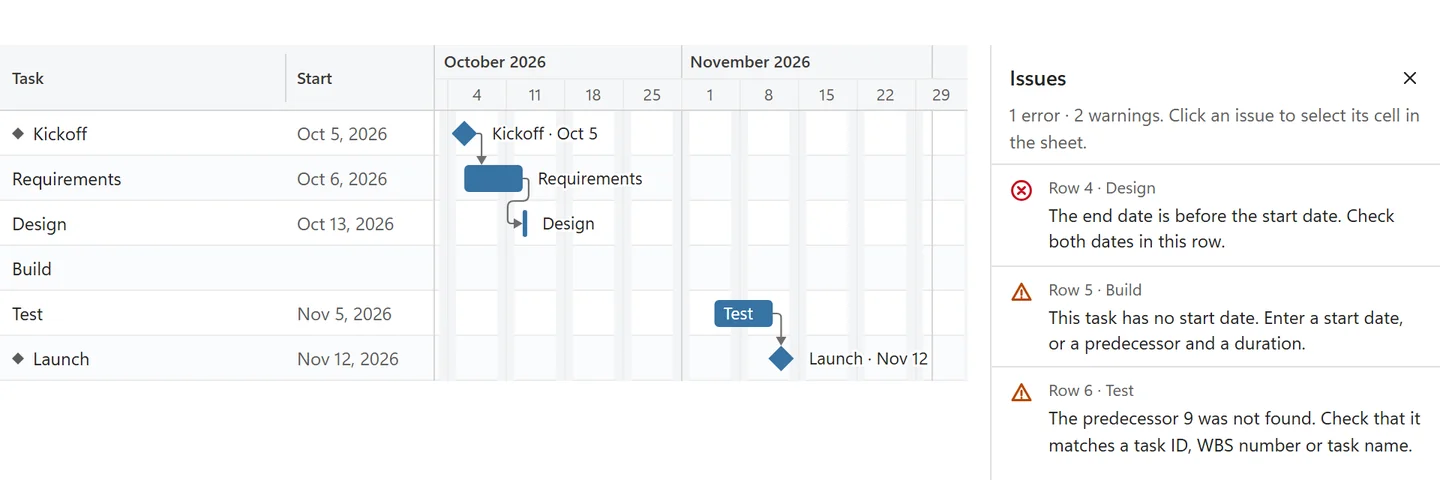
A row with a missing date, an error value such as #N/A, or an end before its start does not stop the chart. The row is skipped or drawn as far as possible, and the Issues button on the toolbar lists it. Click the issue to jump to the cell.
Limits #
A chart reads up to 2,000 task rows (fewer when the table is wider than 20 columns), and texts are shortened after 500 characters. The free version shows the first 10 tasks.