
For people who do not have Excel, or should not get the workbook, SimpleGantt creates an interactive copy of the chart that opens in any browser. HTML files and snapshot links are Pro features (included in the trial).
HTML file #
- Point at the chart and click Export, then Download HTML.
- Send the file by email or put it on a shared drive or intranet.
In Excel on the web your browser downloads the file. In Excel for Windows and Mac the chart opens in your browser, where Download HTML saves the file; for a plan too large to open that way, the file is made in Excel and downloaded.
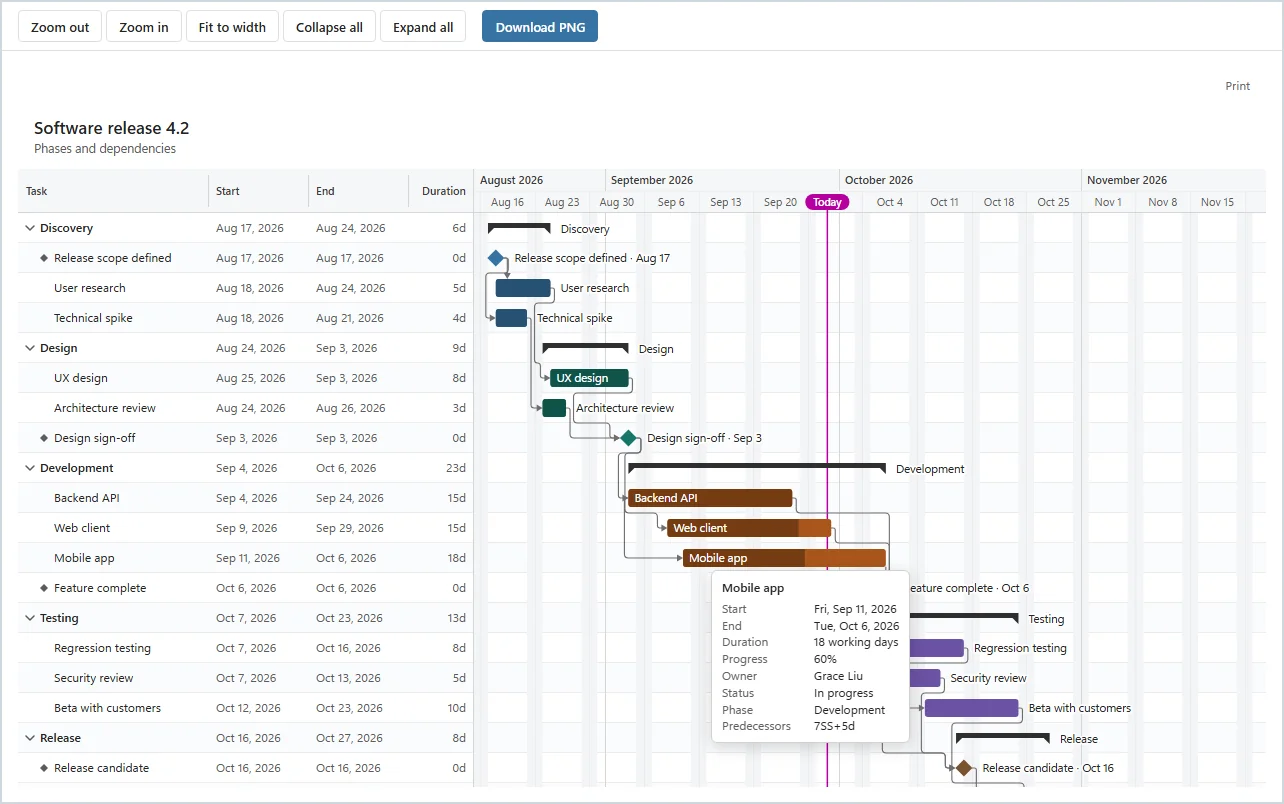
The file is self-contained: it opens in any current browser, even offline, and makes no requests to the internet. Readers can use Zoom out, Zoom in and Fit to width, fold phases with Collapse all, Expand all or the arrow next to a phase, point at a bar for its details, and download a PNG or print. They cannot change the plan.
Snapshot link #
- Click Export, then Copy snapshot link. The link is copied to your clipboard.
- Paste it into a message.
The chart travels inside the link, after the # sign, which browsers never send to a server. Nothing is uploaded and nothing is stored with us. Whoever opens the link gets the same interactive page as the HTML file, labelled as a snapshot of the moment you made it. It does not update when the table changes; send a new link after changes.
If your Excel does not let the add-in write to the clipboard, the snapshot opens in your browser instead: copy the link from the address bar there. Very large plans do not fit into a link; SimpleGantt then says so and suggests Download HTML.
Anyone who has the file or the link can see the plan it contains, including task names, dates, owners and footnotes. Share it only with the right people.