
If you sent a message with a mistake in it, or to the wrong list, you can take the whole campaign back. Undo campaign deletes your messages for everyone in WhatsApp, the same as Delete for everyone in a chat. This is a Pro feature.
People may have seen the message already, for example in a notification. WhatsApp also shows a note in the chat that a message was deleted. Act quickly, and consider whether a short follow-up message would be better.
Undo a whole campaign #
- Open History.
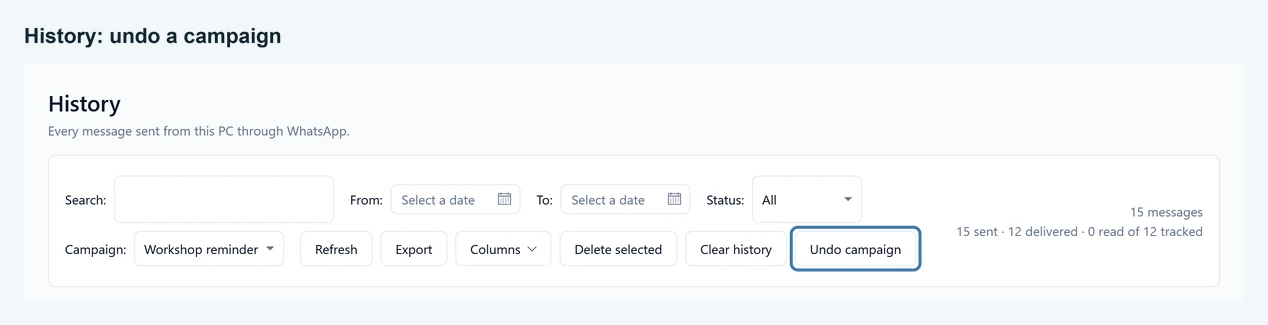
- In the Campaign filter, choose the campaign. The Undo campaign button only appears while a campaign is chosen. Give your campaigns a name on Compose so you can find them here.
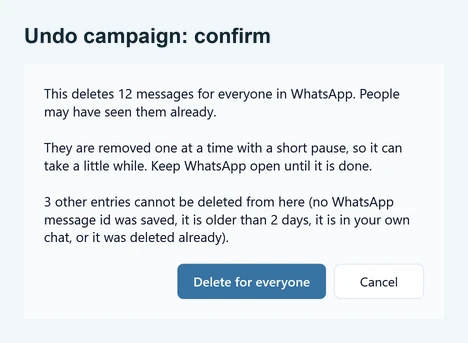
- Click Undo campaign. A confirmation says how many messages will be deleted, and how many entries cannot be deleted and why.
- Click Delete for everyone to start. Keep SendCommander and WhatsApp open until it finishes.
The messages are deleted one at a time with a short pause, so a large campaign takes a little while. Click Stop deleting to stop after the message being deleted right now. When it finishes, you see how many messages were deleted and how many could not be.
Delete one message #
Right-click a row in History and choose Delete for everyone (WhatsApp). The same rules apply. Deleted messages show Deleted for everyone in the Status column. The copy of any photo or file stays on your PC.
What can be deleted #
- Messages from the last 48 hours. WhatsApp only allows deleting for everyone for about two days. SendCommander stops a little earlier to stay safely inside that time.
- Messages SendCommander could follow. That means messages sent with version 1.5 or later while WhatsApp was connected. Older messages cannot be found again. The confirmation counts them as entries that cannot be deleted.
- Messages you sent. Only your own messages are ever deleted, never anything a person wrote to you.
What cannot be deleted #
- Messages in your own chat. If you used Send myself a test, WhatsApp does not delete messages in your own “message yourself” chat for everyone, so those are left out.
- Messages older than 48 hours, or already deleted.
- Messages without a saved WhatsApp message, as described above.
SendCommander checks that WhatsApp really deleted each message. If WhatsApp says it deleted a message but it is still there, the row stays and the summary tells you, so you can try again or delete it in WhatsApp yourself.
Good to know #
- Undo does not run while a send is in progress or scheduled, and a send cannot start while messages are being deleted.
- WhatsApp must say Connected on the WhatsApp screen.
- If a run stops halfway, run it again. Messages that are already gone are skipped.