
Besides Gmail and Outlook, SheetCourier has ready-made settings for many email providers. Open Email accounts and click Add an email account. Yahoo and iCloud have their own tiles. Everything else is under Other.
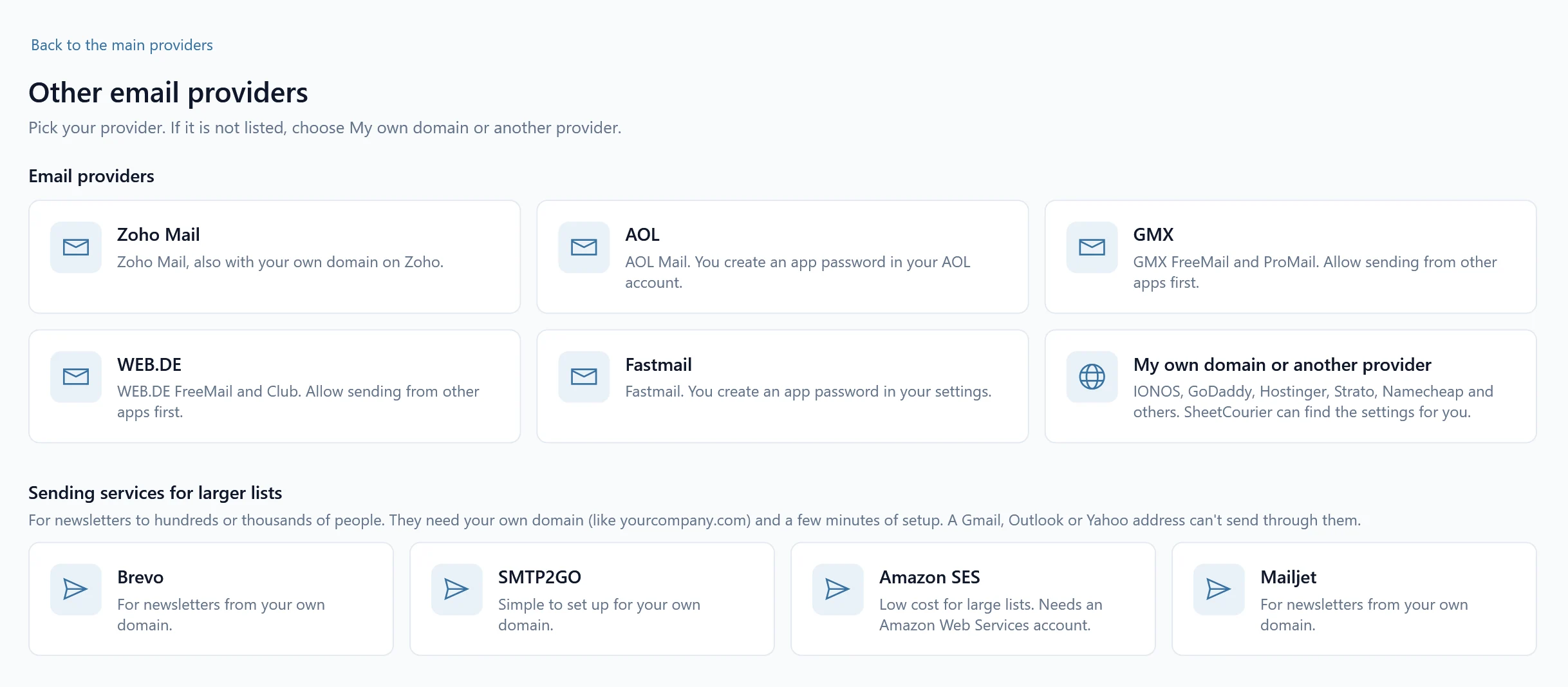
Most providers want an app password: a special password your provider gives you for apps, not your normal password. Each setup screen shows the steps and a button that opens the right page.
Yahoo #
Pick the Yahoo tile.
- Click Open Yahoo to open Yahoo’s account security page (Yahoo’s help) and sign in.
- Click Generate app password, type SheetCourier as the app name and click Generate password.
- Back in SheetCourier, type your email address, paste the app password into App password, click Test connection and then Save.
iCloud #
Pick the iCloud tile. It works for icloud.com, me.com and mac.com addresses.
- Click Open Apple and sign in to your Apple Account (Apple’s help). Two-factor authentication must be on for this.
- Under Sign-In and Security, choose App-Specific Passwords and create one named SheetCourier.
- Back in SheetCourier, type your email address, paste the app password into App password, click Test connection and then Save.
Zoho Mail #
Pick Other, then Zoho Mail. This also works with your own domain on Zoho.
- Click Open Zoho, sign in to Zoho Accounts and open Security, then App Passwords (Zoho’s help).
- Click Generate New Password, name it SheetCourier and copy the password Zoho shows.
- Under Where is your Zoho account?, pick zoho.eu (accounts made in Europe) if your Zoho web address starts with mail.zoho.eu. Addresses ending in @zoho.eu are picked for you.
- Back in SheetCourier, type your email address, paste the app password into App password, click Test connection and then Save.
AOL #
Pick Other, then AOL.
- Click Open AOL to open AOL’s account security page (AOL’s help) and sign in.
- Click Generate app password, type SheetCourier as the app name and copy the password.
- Back in SheetCourier, type your email address, paste the app password into App password, click Test connection and then Save.
GMX #
Pick Other, then GMX. GMX does not use app passwords. Instead you allow sending from other apps once.
- Sign in to GMX in your browser, open Settings, then POP3 & IMAP, and tick the box that allows access through POP3 and IMAP. This also lets apps like SheetCourier send.
- Back in SheetCourier, type your GMX address and your normal GMX password, click Test connection and then Save.
GMX FreeMail allows only a small number of emails a day. SheetCourier fills in a daily limit of 100.
WEB.DE #
Pick Other, then WEB.DE. Like GMX, WEB.DE uses your normal password once sending from other apps is allowed.
- Sign in to WEB.DE in your browser, open Settings (Einstellungen), then POP3 & IMAP, and tick the box that allows access through POP3 and IMAP.
- Back in SheetCourier, type your WEB.DE address and your normal WEB.DE password, click Test connection and then Save.
Fastmail #
Pick Other, then Fastmail.
- In Fastmail, open Settings, then Privacy & Security, then App passwords (Fastmail’s help).
- Click New app password, choose Mail (IMAP/SMTP) as what it can access, name it SheetCourier and copy it.
- Back in SheetCourier, type your email address, paste the app password into App password, click Test connection and then Save.
Your own domain or another provider #
For any other provider, or an address on your own domain (IONOS, GoDaddy, Hostinger, Strato, Namecheap and others), pick Other, then My own domain or another provider.
- Type your email address and password. Some providers want an app password instead of your normal one; their help pages say so.
- Click Find my settings. SheetCourier looks up your email server from your address. Nothing is sent. It then shows, for example, “We found smtp.example.com, port 465.”
- Click Test connection, then Save.
If SheetCourier can’t find the settings, ask your email provider or web host for the outgoing server name and port. Click Show server settings and type them in Server and Port. Leave Security on Automatic (recommended). More in Use your own domain.
Is your address @outlook.com, @hotmail.com or on Microsoft 365? Microsoft doesn’t allow password sign-in for email apps, so use the Microsoft 365 / Outlook.com tile instead (you sign in with Microsoft). See Connect Microsoft 365 or Outlook.com.