
Outlook on this PC sends your mailings through the Outlook program on your computer. You need no password, Outlook sends with the name you set up there, and every email appears in Outlook’s Sent Items. It works with any account you have in Outlook, including work accounts on Microsoft 365 and Exchange.
This needs classic Outlook, the Outlook that comes with Microsoft Office. The new Outlook for Windows and Outlook on the web can’t be used by other apps. Not sure which one you have? See SheetCourier cannot find Outlook (new Outlook).
Connect it #
- Open Outlook and wait until it has started. SheetCourier sends through it, so Outlook must be open when you send.
- In SheetCourier, open Email accounts, click Add an email account and pick Outlook on this PC.
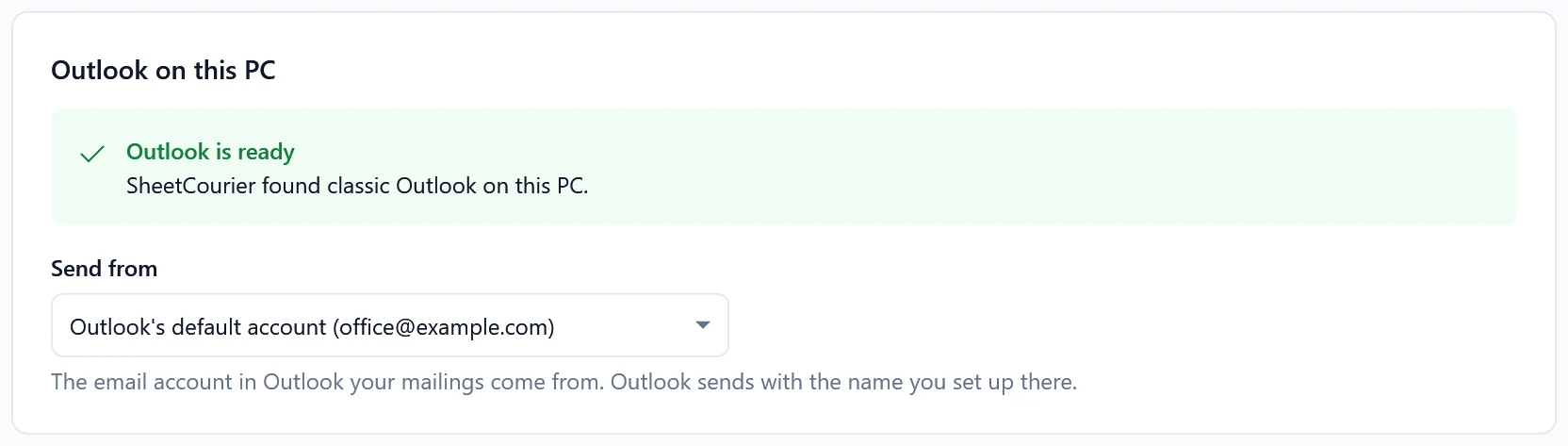
- SheetCourier looks for Outlook. When it finds it, it says Outlook is ready: “SheetCourier found classic Outlook on this PC.”
- Under Send from, pick the account your mailings should come from. If Outlook has only one, it is already picked (for example “Outlook’s default account”).
- Optional: add a Reply-to address or change the Daily limit. SheetCourier fills in 300 emails a day. Outlook.com allows about 300 a day; work accounts allow more.
- Click Test connection, then Save.
What SheetCourier may say #
- Open Outlook before you send. SheetCourier sends through it. Outlook is closed. Open it, then click Check again.
- This PC uses the new Outlook. See SheetCourier cannot find Outlook (new Outlook).
- Outlook is not installed on this PC. Connect your email with another tile, for example Gmail or Google Workspace or My own domain or another provider.
- Outlook has no email account yet. Open Outlook once, add your email account there, then come back.
- Outlook did not answer. Outlook may be showing a message or still starting. Answer the message in Outlook, then click Try again.
- Outlook has several profiles and none is the default: open Outlook with the profile you send from, and SheetCourier lists its accounts.
While sending #
Keep Outlook open until the mailing is done. If Outlook asks “A program is trying to send an e-mail message on your behalf”, see Outlook asks if a program may send email. Emails wait in Outlook’s Outbox until Outlook sends them, so check the Outbox if something seems slow.