
A normal mailbox like Gmail allows a few hundred emails a day. For newsletters to hundreds or thousands of people, use a sending service: a company that sends email for your domain. SheetCourier has ready-made settings for Brevo, SMTP2GO, Amazon SES and Mailjet.
Sending services only work with your own domain (like yourcompany.com). A Gmail, Outlook or Yahoo address can’t send through them: those providers only accept their emails from their own servers, so they would land in spam or be rejected. SheetCourier blocks this and tells you why.
Connect a sending service #
- Open Email accounts, click Add an email account, pick Other and then your service under Sending services for larger lists.
- Create an account and add your domain. Sign up at the service and add your own domain there (they call it a sender or a verified domain).
- Copy your sending details. Copy the user name and key from your account into SheetCourier:
- Brevo: Brevo login is your Brevo login email (shown on the SMTP and API page of your Brevo account); SMTP key is your SMTP key from Brevo, not your login password.
- SMTP2GO: the SMTP user name and SMTP password you created in SMTP2GO, not your SMTP2GO login.
- Amazon SES: the SMTP user name and SMTP password from the Amazon SES console, not your AWS login.
- Mailjet: your API key (Account settings, API keys) and your Secret key.
- In From address (on your own domain), type the address your emails come from.
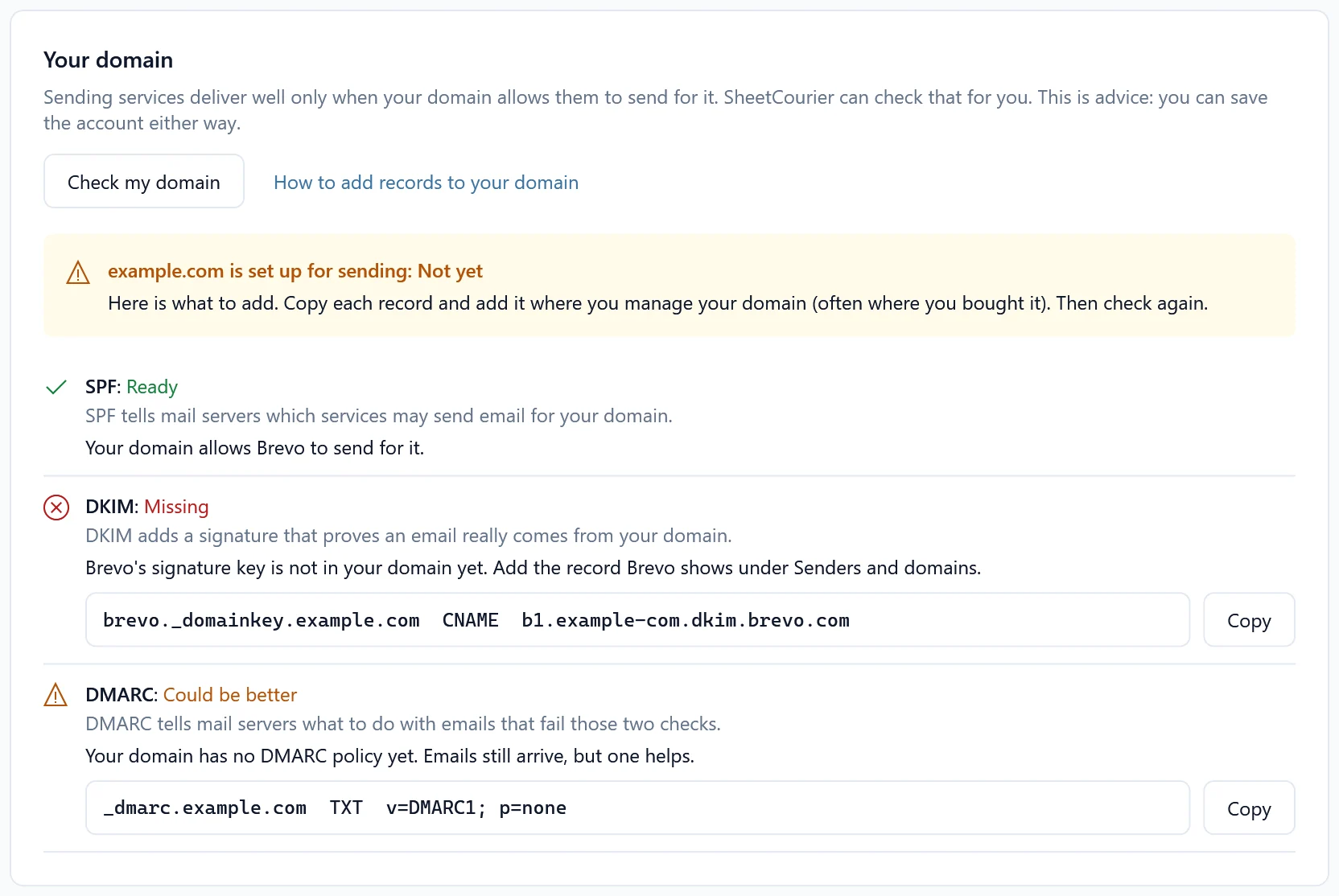
- Check your domain. Click Check my domain. SheetCourier tells you if your domain is ready, and what to add if it is not.
- Click Test connection, then Save.
Reading the domain check #
Each record is marked Ready, Missing, Needs a fix, Could be better or Could not check. For anything missing, click Copy and add the record where you manage your domain (often where you bought it), then click Check my domain again. Changes to a domain can take a while to show up everywhere.
- SPF must list your service, and your domain must have exactly one SPF record.
- DKIM keys are created in your service’s account (for example Brevo: Senders, Domains and Dedicated IPs, Domains; Amazon SES: Identities, your domain, Easy DKIM). SheetCourier can’t see SES and SMTP2GO keys from outside, because their names are unique to your account.
- DMARC: if it is missing, SheetCourier suggests a simple starting record (
v=DMARC1; p=none).
Daily limits #
SheetCourier fills in a daily limit of 200 to 300 emails for these services. Raise it under Daily limit to match your plan with the service. See Daily sending limits explained.